
Best Compact 8K 360 Cameras for VR in 2026
A recent project has put me to work testing the latest and greatest 8K 360 cameras with 10bit color depth. My goal was to find out which camera would give me the cleanest and highest quality 8K 360 video for viewing in a VR headset.
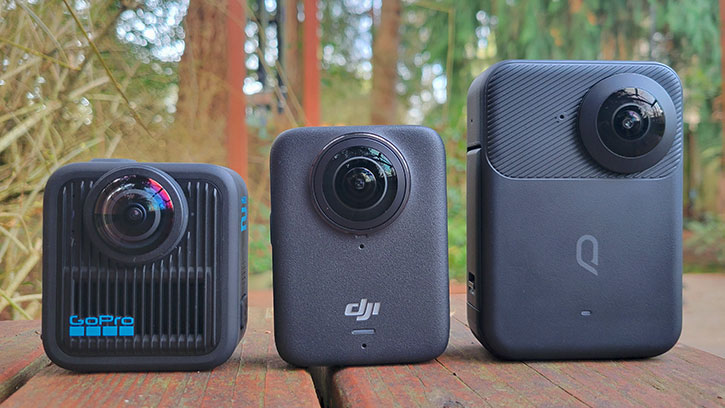
The growing trend towards reframing 360 video has led to a lot of camera manufacturers ignoring or neglecting features that might be useful to VR filmmakers. Of course we use larger professional grade stereoscopic 360 cameras for commercial projects, but sometimes you need that versatile compact camera that can go almost anywhere. But it’s becoming harder and harder to find cams that have clean video output.
The 3 cameras I decided to test that met my criteria were the Qoocam 3 Ultra, DJI OSMO 360, and the GoPro MAX2. All three cameras shoot 8K 360 in 10bit, all three have their own variation of a log mode. For the purposes of the test, 360 video quality was my main concern, so I won’t go into much detail about how they look reframed, or how the mobile apps work. My goal is to find the best 8K compact 360 camera to use for professional projects. Let’s dive in!
DJI OSMO 360

If your only concern is getting the absolute best 8K 360 video quality from a compact camera for VR, the DJI OSMO 360 is the best choice. The dynamic range from its dual 1/1.1-inch CMOS sensors noticeably outperforms the competition. D-Log M is very easy to grade and produces beautiful results.
The DJI is the first and currently the only compact 360 camera to offer 8K 360 video in 48 or 50fps. The 6K60p mode actually produces true 6K video at 6,000x3,000 at 60fps, not just 5.7K, and looks almost as sharp and detailed as the 8K50p mode.
360 video recordings are at 3840x3840 in a layered HEVC container, usually at a bit rate of around 170Mbps depending on the scene. Camera settings allow you to tweak noise reduction and texture (kind of like sharpening), so you can get the cleanest and most unprocessed footage for your post pipeline.
At only 183g, it’s one of the smallest and lightest weight 360 cams available, making it great for flying on drones, mounting on vehicles, or attaching to yourself while you’re doing crazy action stuff. The GoPro MAX2 actually has a smaller body by about 20mm, but weighs 10g more.
Beyond that, I’ll be honest, the camera doesn’t have much utility. The photo modes are very basic, offering only JPEGs at either 30mp (native) or 120mp (computational). There are no DNG raw settings or any way to shoot color correction ready photographs. They’re also stitched in camera, you get what you get. Timelapses cannot be shot in LOG and none of the professional settings apply, and you cannot shoot an interval timelapse with photos. There’s no built-in GPS for those working on mapping projects.
The lenses aren’t replaceable, which is a deal-breaker for a lot of people, but not for me. 360 cams with replaceable outer lens elements tend to have more noticeable sun flare, which I don’t want in VR, especially if I’m flying it on a drone. It can be an unwanted distraction in your finished video. Especially after stabilization, the sun flare is often bouncing around in an annoying fashion.
I’m not primarily a reframer, so I’ll keep my comments on the software and apps brief. It’s really disappointing that there’s not an option to export ProRes or some other intermediate that would be more suitable for post. Currently, the only option to export your beautiful 10bit 8K 360 video is H.265 (HEVC). Crank that bitrate up as far as it’ll go.
All in all, this being DJI’s first 360 camera, they did an excellent job. Compared to other manufacturers like Nikon and Garmin who’ve entered the 360 space and failed, DJI has a very solid camera that beats the competition in video quality, but unfortunately it lacks in features.
GoPro MAX2
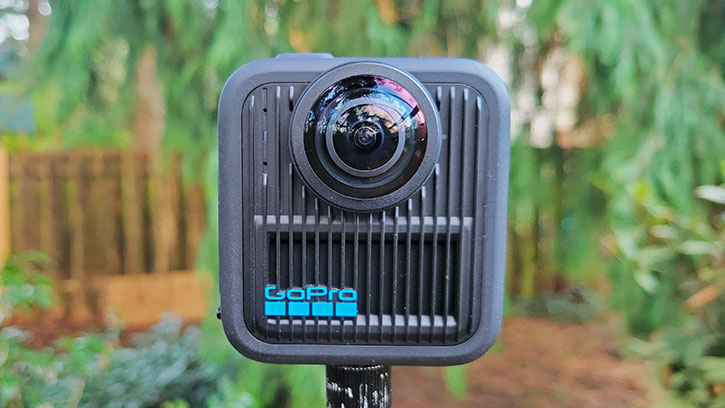
It’s been 6 years. We’ve been waiting a long time but the wait was (mostly) worth it. The GoPro MAX2’s 1/2.3-inch sensor is the smallest in this comparison, but GoPro has done their best to squeeze as much quality out as possible. With experimental GoPro Labs firmware that was available and compatible with MAX2 from day one, you can crank your bitrate output all the way up to 300Mbps. With GP-Log 10bit at 8K30p you can get exceptional detail even in complex scenes with lots of motion.
My favorite thing about the MAX2 is how it feels. Compared to the others, the body has a grippy finish that feels solid and durable. I would feel confident using this as a true action cam, especially considering it has replaceable lenses. The outer lens elements can be purchased as a pair for only $50, you can have them in your pack and be back up and shooting in no time. The only drawback is that these often cause more sun flare, the MAX2 had very noticeable flare when used for aerial 360 video. Fun fact: did you know the Garmin VIRB 360 was the first compact 360 cam with replaceable lenses?
I’m really excited that GoPro Labs makes motion detection possible. I haven’t heard of any other 360 cameras that offer a motion detection feature, it could be amazing for capturing wildlife without having to fill up memory cards waiting for something to happen. This could be the reason I keep this camera in the gear bag.
The MAX2 has built-in GPS, so it’ll work for your Streetview or mapping projects, or with integrated statistical graphics. As with other GoPro products, you can also schedule the camera to wake and start shooting at a specific time, allowing you to set the camera up in the field and leave it to do the work while you’re away.
Although the MAX2 offers more utility, there are a lot of restrictions on how each mode works. For example, you can only capture 10bit GP-Log video in 8K30p, other modes don’t offer it. Video timelapses also can’t be shot in GP-Log, and are not 10bit. Interval photo timelapses can’t be shot in raw (GPR), only JPEG. In fact, you can’t capture GPR 360 photos at all, only the single lens options allow this. I really don’t understand why they did that.
So if you shoot 8K 360 video with 300Mbps 10bit GP-Log with the labs firmware and the bitrate cranked to 300Mbps, you’ll get a tremendous amount of detail, but the dynamic range still lacks compared to the DJI OSMO 360. It’s hard to beat that 1-inch sensor.
Probably the biggest drawback to the MAX2, and this also came with the original MAX, is the proprietary baked-in stitching method that happens in-camera. As a VR filmmaker, it’s a concern for me when there’s a stitch line baked into my footage and there’s nothing I can do in post to fix it. With the DJI or Kandao cameras, I can simply bring my footage into Mistika VR and set all of my own stitching parameters. With the MAX2, I can’t because it’s already been stitched. You get what you get and there’s nothing you can do about it. That’s concerning, especially since I have noticed a hard stitch line in some of my test videos.
However, because of this proprietary method, GoPro is able to utilize more of the sensor with less overlap. This is where the “True 8K” marketing claim comes into play. There are no wasted pixels thrown away on the sensor corners, you get an 8K 360 video without scaling up. But is that slight increase in detail worth a stitch line? (The answer is no).
Overheating hasn’t been a problem for me considering I’m doing testing outdoors in the winter, and mostly with short drone flights. With an indoor test, the camera shut down at about 24 minutes while shooting 8K30p. For GoPro, this seems par for the course. By comparison, I recorded 8K30p on the OSMO 360 for over an hour before I ended the test myself.
The same old GoPro Player app is used on desktop to allow equirectangular output of the recorded MAX2 360 videos, with options to export in H.264, HEVC, or ProRes. The ProRes option is only available on the Mac version, on a Windows box you’ll be stuck with antiquated Cineform. Somehow Kandao can afford the ProRes license for Windows, but GoPro can’t?
Kandao Qoocam Ultra

Kandao has been a pioneer in the 360 video space. They were first to offer 8K in a small form factor with the Qoocam 8K around 6 years ago in 2019. They were the first to offer 10bit with 8K in a compact cam. They were also the first to offer 5.7K at 60fps with the Qoocam Ultra in 2024. That said, being first also means you are the first to learn from mistakes. Kandao has had their fair share of problems, leading to some damage to their reputation when it came to the Qoocam 8K, but I feel like they have redeemed themselves with the Qoocam 3 and Qoocam 3 Ultra. I also appreciate Kandao because they’re always trying to bring features that filmmakers and professionals want.
The Qoocam Ultra is the most versatile of cameras we compared, offering up to 8K30p 360 video in K-Log 10bit, 10bit HLG, or 8bit Rec.709. They also offer a dynamic range boost mode (similar to Insta360’s “HDR video”) that boosts range in bright scenes with dark contrast. Like the MAX2, it has built-in GPS for those who want to use it for mapping or Street View.
You can shoot timelapses in both video mode or as an interval image sequence. The Qoocam Ultra is the only cam in the comparison to offer DNG raw 360 photos, both in 360 photo mode or in timelapse interval. Although the timelapse interval DNGs are very detailed and packed with dynamic range, I was disappointed that nightlapse tests I did had scattered hot pixels throughout the frame that were difficult to correct in post.
Weighing in at 336g, it’s by far the heaviest camera of the bunch, as such it may not be suitable for many “action cam” use cases. For my Mavic 3 Classic, it’s really on the bleeding edge of payload, sometimes the drone struggles and I see that the camera fails to stabilize or introduces rolling shutter jiggle. For this reason, I’d probably rather reach for one of the other 2 cameras for aerial work. The lenses are also not replaceable, so if you end up damaging them you’ll have to send it in for repair.
While it’s probably the best option for those shooting 360 photos thanks to its huge range of options, I would put it last on this list for 360 video. Its 1/1.7-inch sensor seems to struggle with how far they push dynamic range, often introducing a lot of digital noise and artifacts that simply aren’t present on the DJI OSMO 360 or the GoPro MAX2 with its labs firmware. Kandao is also not as strong in color science compared to DJI or MAX2, so it has been more difficult for me to get a grade that I’m happy with when I use the Ultra.
There’s also a fair amount of chromatic aberration, but Kandao’s Qoocam Studio software offers a few options to “defringe” even a manual mode where you can select the unwanted fringe color with an eye-dropper tool. Kandao’s software is more advanced and feature packed than GoPro or DJI, offering the option to apply luts, color correction, multiple stitching modes, calibration, adjustable audio noise reduction, nadir logo placement, and a variety of professional codec export options like ProRes or image sequences. Continuing on with features VR filmmaker professionals want, the Qoocam 3 Ultra is also the only camera of these 3 to offer spatial audio that can be exported from the software.
Despite being packed with features that the GoPro and DJI camera simply don’t offer, unfortunately the Qoocam Ultra just doesn’t compare when it comes to pixel quality. The weight and size are also a major drawback, so I’d be likely to reach for a different camera for 8K capture when I need something compact.
The Verdict

As it goes in the immersive video industry, nothing is ever perfect. We get what we get. Pound for pound when it comes to the quality of the pixels in 8K 360 video, I’d say the DJI OSMO 360 is the clear winner, but I would rank it last when it comes to other features and utility. The GoPro MAX is a close second when it comes to video quality, but it’s plagued by stitching problems due to the proprietary in-cam stitching method. The Qoocam 3 Ultra is loaded with features immersive video professionals need, but it has the most digital artifacts and the worst color science.
In the end, I’d rather have a camera with the exceptional quality and dynamic range of the DJI OSMO 360, the comprehensive features of the Kandao Qoocam 3 Ultra, and the rugged durability (and labs firmware) from the GoPro MAX2. Too bad that product doesn’t exist.
Specs Compared
| DJI Osmo 360 | GoPro MAX2 | Qoocam 3 Ultra | |
|---|---|---|---|
| Sensor | 1/1.1-inch | 1/2.3-inch | 1/1.7-inch |
| Max Res/Framerate | 8K50p | 8K30p | 8K30p |
| Weight | 183g | 195g | 336g |
| Dimensions * | 61x81x33mm | 64x69x50mm | 71x102x41mm |
| GPS | No | Yes | Yes |
| DNG Raw | No | GPR (Not in 360) | Yes |
| Spatial Audio | No | Yes (limited) | Yes |
| Waterproofing | 10 meters (IP68) | 5 meters | 10 meters (IP68) |
| Internal Storage | 128GB | SD card only | 128GB |
* WxHxD rounded to the nearest millimeter.
Which to buy?
- Get the DJI OSMO 360 if pixel quality and dynamic range in 360 video is all that matters to you and you want to watch it in VR.
- Get the GoPro MAX2 if you are a crazy insane extreme sports athlete who breaks cameras all the time doing your epic stunts, and you reframe most of your footage.
- Get the Kandao Qoocam 3 Ultra if you need the best features for 360 photography and time-lapses.
Why not the Insta360 X5?
I thought about testing the Insta360 X5, but it doesn't have a 10bit capture mode. I've worked with lots of X5 footage and I'm not really a fan of how it holds up in VR. There are numerous artifacts and lots of digital noise, even in broad daylight. Insta360 prioritizes a crispy, contrasted and saturated look in favor of reframing. Even when lowering settings like sharpening and using flat color modes, it's difficult to get the X5 to produce clean video.